Let your people do the work that needs people.
Business process automation for teams losing hours to data entry, manual reports and reconciliation. We automate the repetitive work around the way your business actually runs, so your people get their time back, and keep improving it as one monthly service.
Your best people are copying and pasting.
Every week, hours go to work a system could do: typing the same thing twice, building the same report, checking one list against another. It isn’t anyone’s job, so it becomes everyone’s.
- “Somebody loses Friday afternoon to the weekly report.”Admin overhead
- “We check every statement line by line against a spreadsheet.”Manual entry
- “Only one person knows how month-end works.”Workflow friction
- “By the time the numbers are ready, they’re already out of date.”No visibility
Automation built around how the work actually runs.
We start with the work itself: what gets typed, checked, copied and reported every week, and who does it. Then we automate what doesn’t need a person, and send what does to the right person with everything they need.
- Entered once.
- Information is captured where it starts and flows everywhere it’s needed, so nobody types it twice.
- Reports that build themselves.
- The weekly numbers are ready when you are, current, with no one putting them together.
- Checked as the data arrives.
- Statements, invoices and payments are matched against your records automatically, and only the exceptions reach a person.
- A person where judgment matters.
- Anything uncertain is set aside for someone to confirm, with the evidence beside it. Nothing important is decided silently.
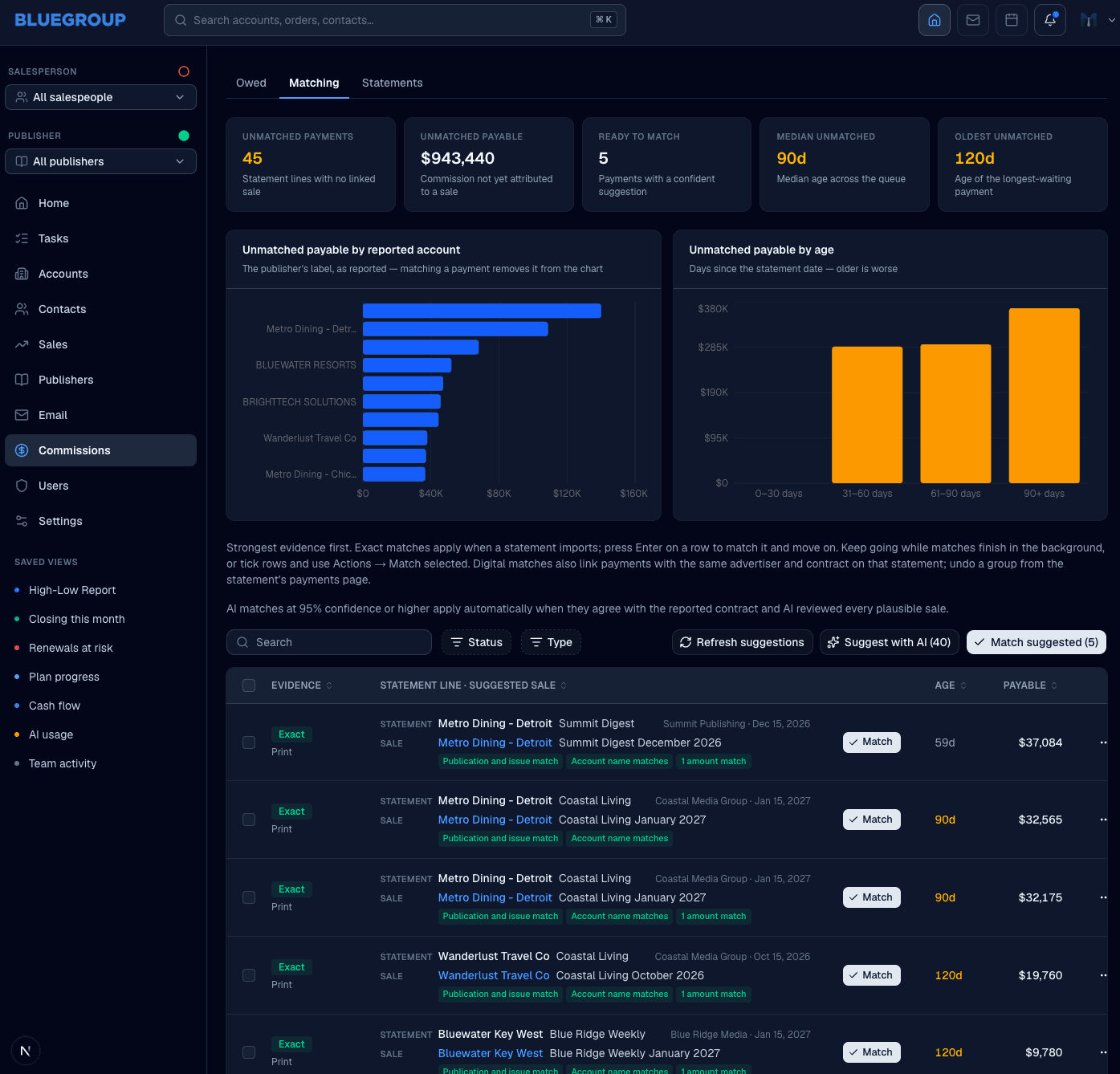
The statement reconciles itself. A person confirms the rest.
Every line is checked the moment the statement arrives. Exact matches apply on their own, matching rules pair most of what’s left, and AI suggests a match for anything remaining, for a person to confirm. Nobody works through it line by line.
An illustration with sample data. Bluegroup Media’s commission statements are matched this way.
The statements that reconcile themselves.
Bluegroup Media sells advertising across print and digital, and its publishers pay it commission. Every time a publisher sent a statement, about once a week, someone spent one to four hours in custom spreadsheets matching each payment to its sale by hand, while checking that no sale had been overpaid or underpaid.
Now it runs on its own. Exact matches apply as a statement arrives, matching rules pair most of what remains, and AI suggests a sale for anything left over, while the system keeps track of what each sale has been paid in total. When we loaded years of commission history into the system, it reconciled all of it in a couple of hours: by our estimate, hundreds of hours of work the old way.
Theirs was commission statements. Yours might be invoices, timesheets or inventory counts. The pattern is the same: the checking a person did by hand now happens as the data arrives, and only the exceptions need a person.
- 1–4 hrs a week
- reconciling publisher statements by hand, before it ran on its own. And that’s one workflow.
The team’s estimate: one to four hours per statement, with about one statement a week.
Sometimes a recipe is enough.
If a task is simple and the same for every business, like sending a form’s answers to a spreadsheet, an off-the-shelf automation recipe is the right call, and we’ll tell you so. It stops working when the steps depend on how your business does things.
- Off-the-shelf automation recipes: Built for the steps every business shares.
- Automation built around your process: Built for the steps only your business has.
- Off-the-shelf automation recipes: Breaks quietly when one of the tools changes.
- Automation built around your process: Owned and kept working, as part of the monthly fee.
- Off-the-shelf automation recipes: Every exception lands back on a person, with no context.
- Automation built around your process: Exceptions reach the right person, with the evidence beside them.
- Off-the-shelf automation recipes: Each recipe runs on its own copy of the data.
- Automation built around your process: Every automation works from the same records.
- Off-the-shelf automation recipes: Six months later, nobody remembers what it does.
- Automation built around your process: Someone who knows the business owns it, and changes it with you.
Use standard software where your needs are standard. Build around the parts of your business that aren’t.
We carry the build. You start paying when it launches.
Traditional custom development asks you to pay a large sum before anything exists, then pay again every time something needs to change. We reverse that: we invest in building your system first, and the same team keeps it working and improving from there.
- First
- The agreement. A written agreement and a detailed specification come before any development starts.
- Launch
- Billing begins. There’s no upfront development fee. Your monthly subscription starts when the system is ready to launch.
- After
- It keeps improving. Hosting, support and continued development, within a scope we agree on in writing, all in the same monthly fee.
What owners ask first.
- They say: “Why not use an off-the-shelf automation tool?”
Sometimes you should, and we’ll tell you when.
For a simple, standard task, a ready-made recipe is quick and cheap. We build when the work depends on how your business does it.
- Carried by: Yours to call
- They say: “Will this replace my staff?”
It gives them their time back.
Automation takes the copying, checking and report-building, so your people spend their hours on the work that needs them.
- Carried by: Gemstone
- They say: “What if it gets something wrong?”
Anything uncertain goes to a person to confirm.
Clear-cut work runs on its own. Anything it isn’t sure of is set aside, with the evidence beside it, for someone to confirm.
- Carried by: Gemstone
- They say: “What should we automate first?”
Whatever eats the most hours each week.
We find it in the first conversation: usually the task everyone complains about and nobody owns.
- Carried by: Gemstone
- They say: “What happens when the process changes?”
The automation changes with it.
Continued development is part of the monthly fee, so a new step or a new rule is a conversation, not a new project.
- Carried by: Gemstone
Tell us what eats your week.
Start with a free 30-minute call about how your business runs. No slide deck, no quote, and if a ready-made tool would do the job, we’ll tell you.